Banana Tree Run AI

Banana Tree Run AI Generator

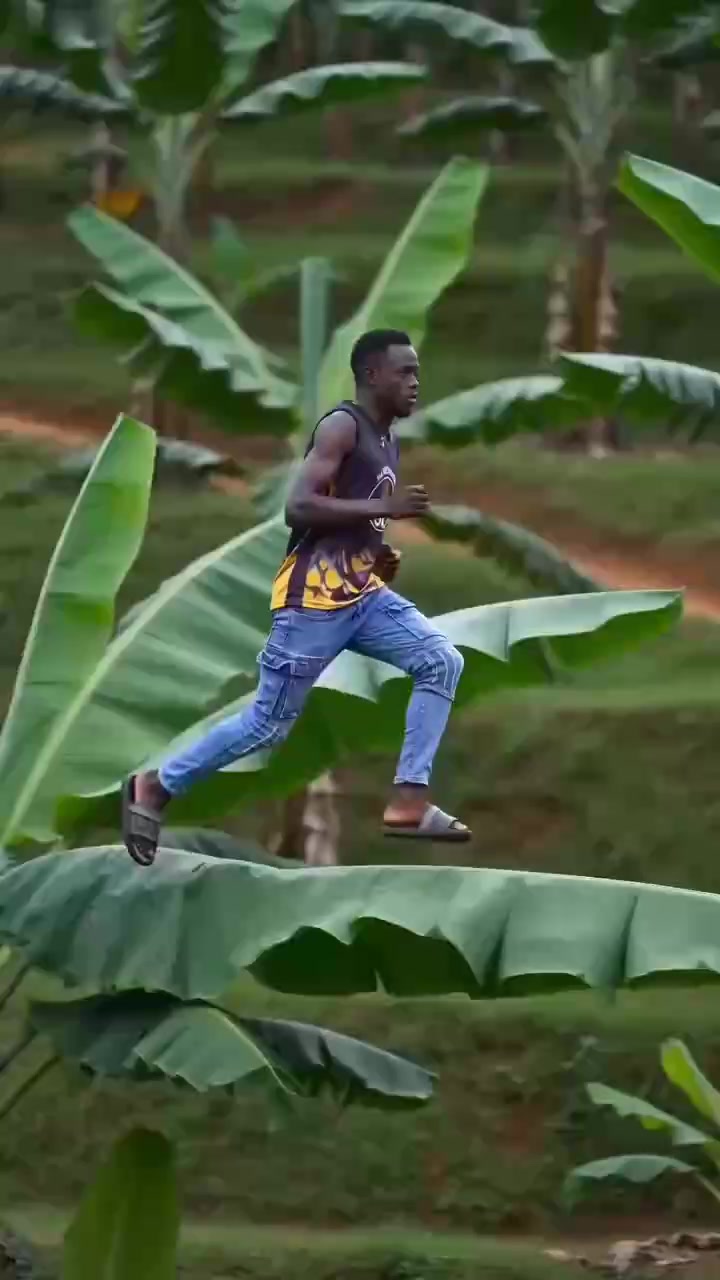
One photo. Run across giant banana leaves.

Create a Banana Tree Run AI video from one photo of an adult. Run across giant banana leaves in a 14-second vertical video—no prompt needed.

Make my video

About 6–8 minutes · Silent MP4 · No added watermark · Failed generations are refunded automatically

Banana Tree Run AI video generator

Run through the leaves

One adult · face clearly visible · JPG, PNG or WebP0/1 photo

Utilisez uniquement une photo quotidienne de vous-même ou d’un ami ayant accepté d’apparaître. Les photos de personnalités politiques, de célébrités ou d’autres personnes publiques, ainsi que les captures de films ou de clips musicaux, présentent des risques liés au droit à l’image et seront refusées lors de la modération.

BackgroundOne scene available
Banana leaf-top runBanana Tree Run AI · daylight
Video qualityChoose by use case
More quality options

Sign in to use credits, or buy one video without an account. Unused credits remain in your account.

No account required · Automatic refund if generation or photo review fails

The private status and result link is sent to your payment email

A failed generation or rejected photo is refunded to the original payment method

Your uploaded photo and finished video are deleted after 30 days

Silent vertical MP4 · no soundtrack is included yet

14 seconds · silent vertical MP4 · no watermark · failed credit jobs return credits; failed one-off purchases are refunded to the original payment method.

Public social trend example

See the banana leaf run in motion

External social-media example · AI-generated media

Popular versions shared on social media

Different creators · one trend

These public social-media examples are shown for trend reference. Copyright remains with their respective creators.

Source and result evidence

A public trend with sources you can verify.

The clips above and the original post below are external social references showing how different creators shared the trend.

TikTok · @big.e.ug

Where the trend came from

A banana-leaf running post published by @big.e.ug on October 15, 2026 helped spread the running version of this trend.

1.8M views157.3K likes3,336 comments8,758 shares

Public-data snapshot · October 20, 2026
Counts change over time. This site is independent and is not affiliated with the original creator.

Trend timeline

  1. Feb 4, 2026

    An earlier slow-walking banana-leaf version appears on TikTok.

  2. Oct 15, 2026

    @big.e.ug publishes the faster side-tracking running version.

  3. Oct 16–18, 2026

    Tutorials and reusable templates spread across creator communities.

What your 14-second result does

  1. 0–4 sec

    The runner is already moving on the leaves as the camera follows from the side.

  2. 4–9 sec

    The same uninterrupted run continues with natural arm movement and stable framing.

  3. 9–14 sec

    Foreground leaves pass the lens and the continuous running shot ends cleanly.

Give the model enough information

A clear three-quarter or full-body photo of one adult is the most reliable starting point.

Use

  • One consenting adult
  • A clear, visible face
  • Even, soft light
  • Most of the body and clothing visible

Avoid

  • Groups or distant subjects
  • Blur, heavy filters or covered eyes
  • Heavily hidden limbs
  • Minors, public figures or video screenshots
Read the complete photo guide

This template references the public trend's motion and framing. It does not copy the creator's face, identity, captions, watermark or audio.

A prepared run, not a blank prompt

The run is already figured out.

Most video tools start with a blank prompt. This Banana Tree Run AI generator starts with a prepared leaf-top run and motion reference, so you can focus on choosing a photo and quality.

01 / MOTION

The scene has a clear direction

Camera movement, framing and sequence follow the prepared Banana Tree Run AI reference.

02 / IDENTITY

You remain the subject

Your uploaded photo guides the main person while the template supplies the surrounding scene.

03 / SIMPLE

No prompt or editing timeline

Choose quality and generate. Follow the result from your private order page or dashboard.

Banana leaf-top run

One scene available

Banana leaf-top run

This Banana Tree Run AI template is one prepared banana-leaf run, not a general video editor.

SceneBanana leaf-top run
FormatVertical short video
InputOne clear photo
WorkflowChoose, upload, generate

A good fit if you want

  • Your photo placed in the banana leaf-top run
  • A short, lively video without writing a prompt

Choose another workflow if you need

  • —A fully custom scene or a long-form video
  • —Precise control over every gesture and shot
Step by step

How to make a Banana Tree Run AI video

Four steps from your phone or laptop. No editing timeline and no prompt to write.

01

Add your photo

Choose one clear, well-lit photo of one adult with a visible face. Only upload an image you have permission to use.

02

Choose quality

Select an available version and resolution. The credit total is shown before you generate.

03

Generate your video

After payment or confirmation, follow photo review and generation from the order page or your dashboard.

04

Download and share

Download the finished video. Guest orders also receive a private result link at the checkout email.

Two ways to buy

Pay for one video or keep credits

Buy one video without signing up, or choose a credit pack for future videos. Credit balances do not expire.

Buy one video without signing up · from US$7.99No account required · Automatic refund if generation or photo review failsMake a video

One-time payment · no subscription · unused credits do not expireMake a video

Questions before you start

Good to know.

Helpful details about photos, generation, credits and your finished video.

What kind of photo should I upload?

Choose one clear, well-lit photo of one adult with a visible face. Full-body or three-quarter photos usually give the most consistent result.

How many credits will my video use?

It depends on the selected version and quality. The exact total is shown in the generator before you confirm.

What happens if the generation fails?

The credits for a failed generation are returned automatically.

How long does a video take?

Most renders take a few minutes. Signed-in users can check the dashboard; guest buyers can use the private order page and receive the result link by email.

How are my photo and video handled?

Your upload and result stay private to the order and are deleted automatically after 30 days. They are not added to public examples without permission.

Can I use someone else's photo?

Only upload your own photo or a photo of an adult you have permission to use. Do not upload photos of minors or people who have not consented.

Ready to run through the leaves?

One photo, a prepared run, and a few minutes to your video.

Make a video